ContentMK — WordPress Content Manager

Your Content, Organized. Finally.

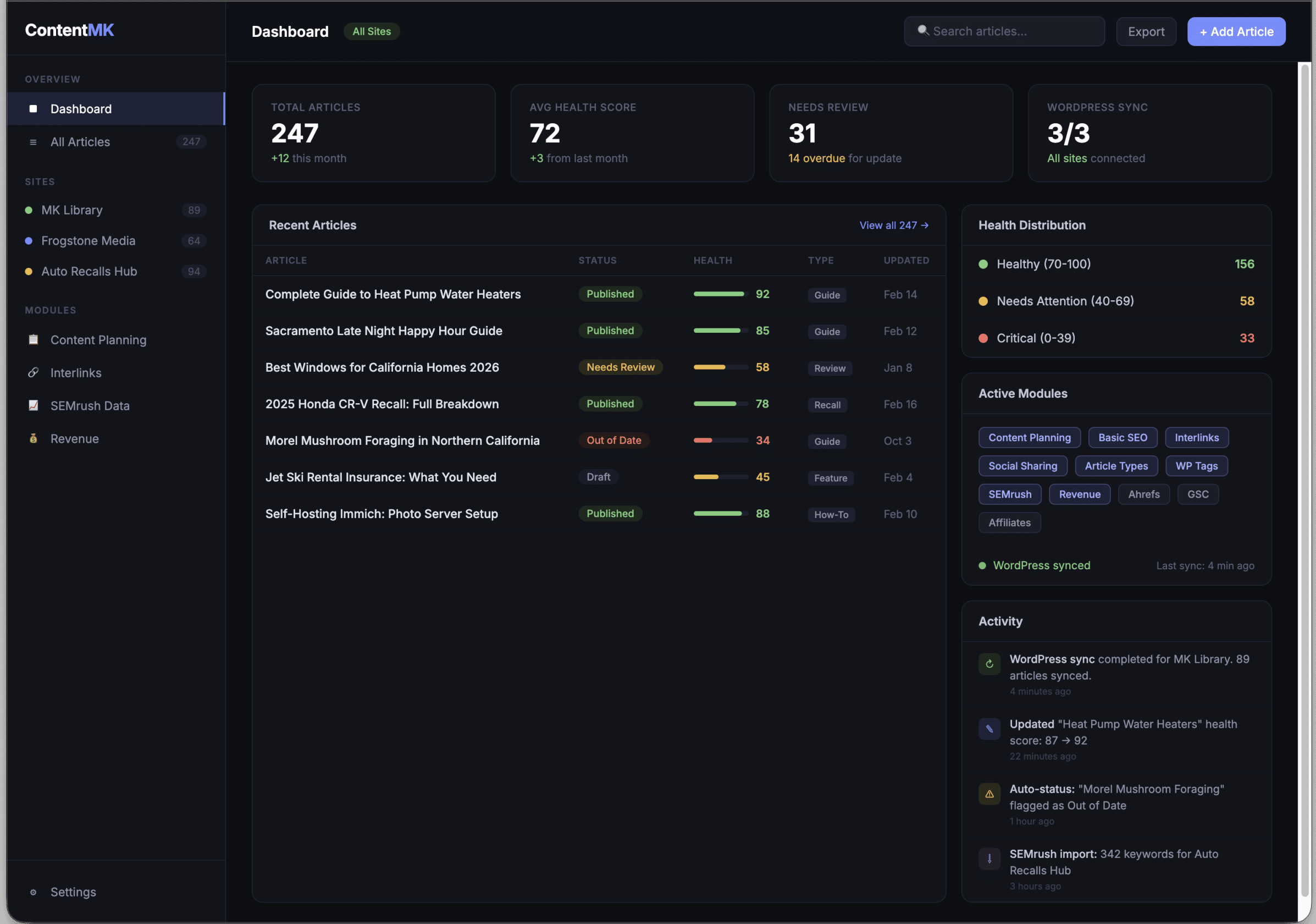
ContentMK is the desktop content management platform that replaces spreadsheets, browser tabs, and scattered tools with one app. Track every article across every site. Know what needs updating, what’s performing, and what’s missing.

Key Takeaways

  • Multi-site content tracking from a single dashboard. Every article, every status, every metric in one view.
  • Modular by design. Start with the free core. Add SEO data, WordPress sync, revenue tracking, or AI-powered Pinterest pins as you need them.
  • Desktop-first, privacy-first. Your data lives on your machine in a local SQLite database. No cloud dependency. No vendor lock-in. Works offline.
  • WordPress sync engine with bidirectional sync, conflict detection, SEO plugin auto-detection, and rate limiting built in.
  • 8 free modules included: Content Planning, Import Tools, Basic SEO, Interlink Manager, Social Sharing, Article Types, WP Tags, and Claude Code Integration.
  • 13 paid modules for SEMrush, Ahrefs, Google Search Console, revenue analytics, team collaboration, affiliate links, and more.
  • Comprehensive backup system with automatic snapshots, one-click restore, and changelog timeline.

What Is ContentMK?

ContentMK is a desktop application for content managers, SEO professionals, and digital publishers who run content across multiple websites. It pulls together content tracking, planning, SEO analysis, internal linking, WordPress management, and revenue analytics into a single modular platform.

Built for macOS and Windows, ContentMK stores all data locally in a SQLite database at ~/ContentMK/data.db. The app runs an Express API server on your machine, so you get instant access to your content data without internet latency or cloud service dependencies.

Who Is It For?

  • Solo bloggers managing 1-3 niche sites who need to track article freshness, SEO keywords, and affiliate links
  • WordPress publishers who want two-way sync between their CMS and a dedicated management tool
  • SEO professionals importing data from SEMrush, Ahrefs, and Google Search Console to correlate rankings with content
  • Content agencies managing 5-10+ client sites with team collaboration, revenue tracking, and branded reports
  • Monetized publishers tracking guest post orders, affiliate earnings, and advertising revenue per article
  • Niche publishers in verticals like automotive, real estate, or travel who need specialized metadata tracking (available via paid modules)

How It Works

  1. Add your sites. Enter your website name, URL, and pick a color. Each site gets its own dashboard, article list, sync settings, and module configuration.
  2. Import your content. Pull articles from WordPress via the REST API, crawl your sitemap, or upload a CSV. Duplicate detection prevents double-entries.
  3. Track and manage. Every article has a status (Published, Draft, Needs Review, Out of Date), health score, categories, and notes. Age-based auto-status detection flags stale content automatically.
  4. Extend with modules. Activate free modules for content planning, SEO metadata, internal linking, and social sharing. Add paid modules for SEMrush/Ahrefs data, revenue analytics, WordPress publish-back, and more.
  5. Keep everything synced. The WordPress Sync Engine maintains a live connection to your WordPress sites. You’ll know instantly when content changes on either side.

Core Features (Included in All Plans)

Multi-site workspaces

Manage any number of websites from a single app. Each site has its own dashboard with article stats, sync status, and recent activity. You get article lists with sorting, filtering, and search. WordPress sync configuration per site. Module activation per site. Custom color coding for visual identification. Configurable freshness thresholds (for example, 3 months = needs review, 6 months = out of date).

The sidebar switches between an “All Sites” overview and a per-site hub with six sections: Dashboard, Articles, Planning, Sync, Backups, and Settings.

Article tracking

Every article is tracked with a title and URL (unique constraint per site to prevent duplicates), status (Published, Draft, Needs Review, Out of Date with auto-detection by age), health score (0-100 composite that adapts to active modules), categories for organization, last updated date that drives auto-status detection, and a free-text notes field.

The article list uses TanStack Table with sortable columns and client-side search. Filtering is instant on title, URL, and categories starting at 3 characters.

Content health score

A multi-factor 0-100 score that tells you at a glance how healthy each article is:

FactorWeightWhat it measures
Freshness40%Days since last update vs. site threshold
SEO completeness25%Target keyword, search volume, keyword difficulty filled in
Internal links20%Inbound + outbound links vs. site average
Social engagement15%Shared on N platforms

The score adapts to which modules are active. If you don’t use the Social Sharing module, that 15% redistributes to other factors. Freshness always carries at least 50% weight.

Auto-status detection

Articles automatically transition to “Needs Review” or “Out of Date” based on their age relative to configurable per-site thresholds. A news site might flag articles after 1 month. An evergreen resource site might use 6-month and 12-month thresholds.

Full-text search

SQLite FTS5 powers full-content search across all articles. Search titles, URLs, notes, categories, and article body text.

Data export

Export your data in JSON, CSV, PDF, or HTML format. Export is always available, even if your subscription lapses.

WordPress sync engine

A core service (not a module) that provides a unified WordPress REST API client. All WordPress-related modules share this engine.

  • Connection management with per-site WordPress credentials (URL, username, Application Password)
  • Rate limiting with configurable pause between batch requests (default: 300ms every 10 requests)
  • Sync state tracking with per-entity status: synced, local ahead, WP ahead, or conflict
  • Conflict detection via modified-since comparison between local and WordPress timestamps
  • Field selection using _fields= parameter on all GET requests to minimize payload
  • Silent batch mode with one summary notification instead of per-item alerts during bulk operations

The Sync page shows connection status, sync statistics (total tracked, synced, local changes, conflicts), and a changelog timeline with the ability to revert individual changes.

Manual Import fallback: When WordPress sync isn’t available (no API access, non-WordPress sites), a collapsed section on the Sync page provides CSV and Sitemap import wizards as an alternative.

Backups & restore

Comprehensive local backup system built into every site:

  • Automatic snapshots created before every sync operation. Named with timestamps for easy identification.
  • Manual snapshots on demand from the Backups page.
  • Retention policy. Configurable maximum snapshot count per site. Oldest snapshots auto-pruned after each new snapshot.
  • Restore any snapshot with one click. A safety snapshot is automatically created before restore so you can undo if needed.
  • Export snapshots to files for archival. WordPress Application Passwords are automatically stripped from exported files for security.
  • Changelog. Timeline of all sync changes (creates, updates, deletes) with the ability to revert individual changes.
  • Global view. “All Sites” Backups page shows snapshots across all sites in one place.

Cloud Sync ($25/mo) extends this with offsite backups, multi-device sync, and scheduled cloud backup operations.

Activity log

Every change across the app is logged: article creates, updates, deletes, imports, sync operations, module activations.

Dark mode

Dark mode is the default, with a light mode toggle in the sidebar. Theme persists across sessions via localStorage.


Free Modules (8 Modules, Included With All Plans)

Free modules ship with the app and can be activated per-site at no cost. They provide the full content management workflow out of the box.

Content planning

A complete content planning suite for editorial workflows:

  • Content Ideas. Idea backlog with a status workflow: Idea, Researching, Planned, In Progress, Published. Each idea has title, status, priority, and notes. Ideas link to articles when published.
  • Content Clusters. Group articles and ideas by topic for authority building. Visual coverage tracking per cluster.
  • Update Scheduling. Assign update frequency to articles (weekly, monthly, quarterly, biannual, yearly). Track next due date. Overdue items surface on the dashboard.
  • Content Briefs. Create structured briefs with target keyword, search intent, suggested outline, target word count, tone notes, competitor URLs, and internal linking targets. Briefs auto-populate from other active modules when available. Export as Markdown or PDF for writer handoff.

Import tools

Three methods to get existing content into ContentMK:

  • WordPress REST API. Connect to any WordPress site. Pull public posts unauthenticated, or use Application Passwords for drafts, private posts, and full content. Progress tracking, duplicate detection, import undo.
  • Sitemap crawl. Paste a sitemap URL. Auto-detects sitemaps from robots.txt and common paths. Handles sitemap index files. Optional content fetching with rate limiting.
  • CSV upload. Drag-and-drop file upload. Auto-detects column mapping with fuzzy header matching. Preview before import. Handles duplicates (skip or overwrite).

All three methods share a common article inserter with URL-based duplicate detection. Import history tracks every import with source, count, and undo capability.

Basic SEO

SEO metadata tracking with WordPress SEO plugin integration:

  • Per-article fields: target keyword, search volume, keyword difficulty (0-100)
  • Per-idea fields: same fields plus secondary keywords and competitor URLs for research
  • WordPress SEO plugin integration. Auto-detects which SEO plugin your site uses (Yoast, Rank Math, SEOPress, or AIOSEO) and pulls SEO titles, meta descriptions, canonical URLs, Open Graph data, robots directives, and schema markup directly from the plugin. No extra configuration needed.
  • Schema markup tracking. Track which articles have structured data (FAQ, HowTo, Article, Review, Product, Recipe, etc.). Auto-detect from article content (parses JSON-LD blocks) and from WordPress SEO plugins. Coverage dashboard with per-type breakdown.
  • SEO completeness indicator. Per-article colored badge showing how many fields are filled. “Missing SEO data” and “Missing schema” filters in the article list. Feeds into health score (25% weight).
  • Source tracking. Every SEO field shows where its data came from (manual entry, Yoast, SEMrush, etc.). Manual edits always take priority over plugin or premium module data.

Foundation for premium modules. Basic SEO’s data layer is designed as the foundation that premium modules build on. SEMrush, Ahrefs, and Google Search Console modules enrich the same SEO metadata with professional-grade keyword data, rank tracking, and real search performance metrics. All queryable from one table.

Interlink manager

  • Manual link tracking. Track which articles link to which, with anchor text. Inbound and outbound link lists per article.
  • Auto-suggestions. Three-layer algorithm: cluster/category matching, FTS5 content overlap, and link gap analysis (articles with zero links).
  • Suggestion tracking. Each suggestion can be accepted or dismissed. Progress tracking (“X of Y suggestions implemented”).
  • Health score integration. Link count relative to site average feeds the 20% links factor.

Social sharing

  • Configurable platforms. Default: Facebook, Reddit, LinkedIn, Pinterest, X/Twitter. Add, remove, or reorder per site.
  • Share history. Multiple shares per article per platform (for re-sharing evergreen content). Each share records timestamp, optional post URL, and notes.
  • Filters. “Unshared” filter (articles not shared anywhere), “Ready to reshare” filter (last share > N months ago).
  • Health score integration. Share coverage across platforms feeds the 15% social factor.

Article types

  • Built-in types: Review, Guide, News, Feature, How-To, Comparison, Listicle, Explainer, Roundup, Event, Recall, Podcast, Opinion, Interview, Case Study
  • Custom types. Add site-specific types beyond the defaults.
  • Visual integration. Color-coded type badges on article cards. Filter by type with counts. Distribution chart on dashboard.

WordPress tag manager

Full bidirectional WordPress tag and category management via the Sync Engine:

  • Tag catalog sync. Pull all tags and categories from WordPress with article counts.
  • Issue detection. Typo detection (fuzzy matching), duplicate detection (case/hyphen variants), orphan tags (zero articles), thin tags (one article), overly broad tags (50+ articles).
  • Write operations. Rename, delete, merge tags directly from ContentMK. Rate-limited batch operations.
  • Tag gap analysis. Per-article three-way analysis: matched (correct), missing (should be added), extra (should be removed). One-click “Apply Missing” action.
  • Naming conventions. Flag inconsistent casing, suggest standardization.

Claude Code integration

  • Phase 1 (current): Structured exports. Export site data as JSON or Markdown files optimized for AI prompt workflows. Article inventory, content gaps, cluster maps, idea backlogs, linking opportunities, health summaries. Written to ~/ContentMK/exports/ for easy access.
  • Phase 2 (planned): MCP server. Expose ContentMK data via Model Context Protocol. Claude Code connects directly to query articles, update statuses, add ideas, and run analysis.

Paid Modules (13 Modules)

Paid modules extend ContentMK with specialized capabilities. Each is priced independently. Module licensing is per-account (buy once, use on all sites). Module activation is per-site (toggle which modules each site uses).

All modules are always visible in the UI. Locked modules show a preview of what they do with an upgrade prompt. You discover features in context, not on a separate add-ons page.

SEMrush integration ($39/mo)

Full SEMrush data integration with two modes:

  • CSV import. Upload exports from SEMrush (Organic Positions, Keyword Overview, Keyword Gap, Keyword Magic, On-Page SEO, Backlinks). Auto-detect report type and column mapping.
  • Live API. Enter your SEMrush API key for automatic weekly/monthly ranking refreshes. Position change alerts. No manual exports needed.
  • Keyword & rank tracking. Automatically tracks positions for your target keywords. Position history, SERP feature detection (featured snippets, PAA, etc.), CPC data, and trend analysis. Compare estimated rankings with actual Google data when GSC module is also active.
  • Competitor monitoring. Track competitor domains. Keyword overlap analysis. Content gap detection (topics competitors cover that you don’t). Competitor ranking change alerts.
  • Auto-linking. Keywords automatically link to articles via URL matching and title-word matching.
  • Opportunity scoring. volume * (100 - KD) / 100 ranks keywords by potential value.

Ahrefs integration ($39/mo)

Same two-mode approach as SEMrush, with Ahrefs-specific data:

  • CSV import. Ahrefs Organic Keywords, Keyword Explorer, Content Gap, Site Explorer, Backlink Profile.
  • Live API. Ahrefs API key for automatic data pulls.
  • Keyword & rank tracking. Tracks positions for target keywords. Position history, backlink counts per article, referring domain tracking. Compare Ahrefs estimates with actual Google data when GSC module is active.
  • Competitor monitoring. Content gap analysis, keyword overlap, backlink comparison, competitor organic traffic trends.
  • Ahrefs-specific fields. Domain Rating, URL Rating, traffic estimates, traffic value integrated into article views.

Automotive intelligence ($25/mo)

For automotive publishers tracking vehicle coverage:

  • Vehicle metadata. Tag articles with Year/Make/Model (multiple vehicles per article).
  • Built-in database. Pre-populated with 50+ US-market manufacturers and 200+ models. Add custom entries.
  • Coverage tracking. Heatmap showing manufacturer x model coverage. Identify gaps in high-priority models.
  • Priority levels. High/Medium/Low priority per model based on market importance.
  • Model year tracking. Track which model years are covered. Redesign alerts when new generations launch.

Google Search Console ($25/mo)

Real search performance data per article. The ground truth for how Google sees your content:

  • OAuth connection. Read-only access to Search Console data.
  • Historical data. Up to 16 months of data on initial connect.
  • Per-article metrics. Impressions, clicks, CTR, average position over time.
  • Keyword discovery. See actual search queries driving traffic to each article. Auto-populate target keywords from top queries.
  • Rank tracking. Real position data from Google (not estimates). Compare with SEMrush/Ahrefs estimated positions when those modules are active. Overlay multiple data sources on a single chart.
  • Declining alerts. Automatic alerts when articles lose significant impressions or position.

Cloud sync ($25/mo)

Sync ContentMK data between multiple desktop installations:

  • Field-level merge. Each record tracks per-field timestamps. Concurrent edits to different fields merge cleanly.
  • Conflict resolution. Same-field conflicts: most recent edit wins with a conflict log for review.
  • Background sync. Every 5 minutes when online, plus manual “Sync Now” button.
  • Offline support. Full functionality offline. Changes queue and sync on reconnect.
  • Encrypted. TLS in transit, AES-256 at rest.

Team collaboration ($30/seat/mo, requires Cloud Sync)

  • Roles. Owner (full control + billing), Editor (create/edit/delete content), Viewer (read-only).
  • Assignments. Assign articles and ideas to team members. “My Tasks” view.
  • Team activity feed. Real-time stream of who edited what, with filtering by member and action type.
  • In-app notifications. Assignments, edits to your articles, overdue items.
  • Pricing. Owner seat included in base plan. Additional seats $30/mo each.

Revenue & campaign analytics ($75/mo)

Full revenue intelligence for monetized publishers:

  • Revenue tracking. Log income from sponsored content, guest posts, link insertions, display ads. Manual entry or CSV import.
  • Client management. Client database with lifetime revenue, last order date, retention metrics, lifetime value analysis.
  • Agency tracking. Track referral agencies and platforms with revenue attribution.
  • Campaign analytics. Revenue by site, time period, client, article, campaign type. YoY and MoM comparisons.
  • Pricing intelligence. Listed rates vs actual rates. Revenue leakage detection. Rate card management.
  • Advertiser categories. 8 categories (Home Services, Legal, Automotive, Healthcare, Pets, Food, Finance, Tech) with revenue attribution.

Collections & invoicing ($50/mo, requires Revenue Analytics)

  • Aging analysis. Outstanding payments in 30/60/90-day buckets with color coding.
  • Collection escalation. 3-tier email templates (Friendly Reminder, Direct Follow-Up, Final Notice) with merge fields. Copy-paste to your email client.
  • Invoice generation. Branded PDF invoices with customizable logo, business info, and line items. Auto-populate from campaign data.
  • Outreach tracking. Log when each escalation tier was sent and responses received.

Guest post management ($50/mo)

  • Order pipeline. Kanban-style view: Inquiry, Accepted, Content Received, Published, Paid.
  • Pricing intelligence. Rate cards per site and order type. Listed vs actual rate tracking.
  • Agency tracking. Which agencies send the most orders and revenue.
  • Inventory management. Available placement slots per site. Link insertion availability. Capacity planning.
  • Data sharing. Shares clients and agencies with Revenue Analytics when both are active.

Scheduled reports ($25/mo)

  • Report types. Content Health Summary, SEO Overview (with SEMrush/Ahrefs/GSC data), Schedule Report, Revenue Summary (with Revenue Analytics data).
  • Delivery. SMTP or Gmail/Outlook OAuth. Weekly, bi-weekly, or monthly schedules.
  • Format. Styled HTML email body + PDF attachment. Customizable branding.
  • Recipients. Multiple recipients per report. Recipient groups. Per-recipient section customization.

Affiliate link manager ($49/mo)

  • Program registry. Track affiliate programs across networks (Amazon, ShareASale, CJ, Impact, Awin, etc.).
  • Article-link mapping. Scan article content for affiliate URL patterns. Track which links appear in which articles.
  • Link health monitoring. Periodic HTTP status checks. Flag broken links, expired programs, dead redirects.
  • Revenue attribution. Log earnings per article and per program. CSV import from affiliate dashboards.
  • Opportunity detection. Articles with zero affiliate links flagged as missed monetization opportunities.

WordPress publish-back ($49/mo)

Push content changes from ContentMK back to WordPress:

  • Sync scope. Status, title, content, categories, tags, excerpt, featured image, custom fields. Select which fields to push.
  • Change preview. Side-by-side diff showing ContentMK vs current WordPress version before pushing.
  • Conflict detection. Warns if WordPress content changed since last sync. Options: overwrite, skip, or re-import.
  • Batch push. Select multiple articles, preview all changes, push with rate limiting.
  • Audit log. Every push logged with before/after snapshots for rollback reference.

Pinterest pin creator ($25/mo + per-pin credits)

AI-powered Pinterest pin creation:

  • AI pipeline. Article goes to Claude AI for analysis (content + images), then to Canva for design, then to Pinterest for posting.
  • Metadata generation. Claude AI generates Pinterest-optimized title (100 chars), description (500 chars with keywords), board suggestion, and up to 20 tags.
  • Canva integration. OAuth connection. Use your templates or ContentMK-provided templates. Auto-populate with AI-generated content.
  • Pinterest integration. OAuth connection. Post to selected board. Schedule for optimal times. Track pin performance (impressions, saves, clicks).
  • Credit system. 25 pins/mo included. Additional credits via advance-purchase packs ($10/25, $20/60, $50/175). Dynamic pricing based on current API costs.
  • Cost transparency. Per-pin cost breakdown showing Claude API tokens, Canva API costs, and total.

Pricing

Base plans

PlanSitesMonthlyAnnual (save 2 months)
Starter1 site$49/mo$490/yr
Growth3 sites$99/mo$990/yr
Scale10 sites$249/mo$2,490/yr

All plans include the full core app (article tracking, health scores, auto-status, search, export), all 8 free modules, WordPress Sync Engine, dark mode, unlimited articles per site, and macOS + Windows support.

Paid module pricing

ModulePrice
SEMrush Integration$39/mo
Ahrefs Integration$39/mo
Automotive Intelligence$25/mo
Google Search Console$25/mo
Cloud Sync$25/mo
Team Collaboration$30/seat/mo
Revenue & Campaign Analytics$75/mo
Collections & Invoicing$50/mo
Guest Post Management$50/mo
Scheduled Reports$25/mo
Affiliate Link Manager$49/mo
WordPress Publish-Back$49/mo
Pinterest Pin Creator$25/mo + credits

Everything Plan ($374/mo)

All 13 paid modules for one price. Save ~23% vs buying individually ($108/mo saved). Includes 1 team seat (owner), 25 Pinterest pins/mo, additional team seats at $30/mo each, and additional pin credits purchased separately.

Example configurations

Use CaseConfigurationMonthly Cost
Solo bloggerStarter + SEMrush + Affiliates$137/mo
Automotive publisherGrowth + SEMrush + Automotive + GSC$188/mo
WordPress publisherGrowth + SEMrush + Affiliates + WP Publish-Back$212/mo
Content creator with PinterestGrowth + Pinterest Pin Creator$124/mo
Content agency (5 people)Scale + Everything Plan + 4 seats$743/mo

No free trial, no free tier

Pay from day one. 30-day money-back guarantee. If your subscription lapses, you get a 7-day grace period before the app locks to read-only mode. Data export always works regardless of subscription status.


Technical Details

Architecture

  • Electron desktop app (macOS + Windows)
  • React + TypeScript + Vite frontend with Tailwind CSS and shadcn/ui components
  • Express + TypeScript API server running locally on port 3001
  • SQLite database at ~/ContentMK/data.db (one file per customer)
  • FTS5 full-text search engine
  • All data stored locally. No cloud dependency for core functionality.

Privacy & data ownership

  • Your data stays on your machine.
  • No telemetry by default (opt-in analytics only, PostHog).
  • No cloud account required for core features.
  • Export everything at any time in JSON, CSV, PDF, or HTML.
  • Cloud Sync module is optional. It only sends data to our servers if you choose to enable it.

WordPress integration

ContentMK connects to WordPress via the standard REST API:

  • Read access works with public sites (no credentials needed for published posts).
  • Full access requires WordPress Application Passwords (built into WordPress 5.6+).
  • Rate limiting prevents overwhelming your WordPress server.
  • Future-proofed for WordPress AI Building Blocks (MCP Adapter, Abilities API) when available.

Module system

  • Modules are independently developed and tested.
  • Each module has its own database tables, API routes, and UI components.
  • Module tables are created on first activation (not at install).
  • Deactivating a module hides its UI but preserves all data.
  • Re-activating restores access instantly.

System requirements

  • macOS 12 (Monterey) or later
  • Windows 10 or later
  • ~200MB disk space for the app
  • Database and cache size depends on content volume (typically 50MB-2GB)

FAQ

Can I use ContentMK without WordPress?

Yes. ContentMK works with any website. Import articles via CSV or sitemap crawl. The WordPress sync features are optional. The core app tracks content regardless of your CMS.

What happens to my data if I cancel?

Your data stays on your machine. The SQLite database at ~/ContentMK/data.db is yours. Export is always available, even after cancellation. The app enters read-only mode after a 7-day grace period, but your data is never deleted or locked away.

Can I use it on multiple computers?

Your license works on unlimited machines. Without the Cloud Sync module, each machine has its own independent database. With Cloud Sync ($25/mo), data syncs between all your devices automatically.

Do I need both SEMrush and Ahrefs modules?

No. Most users subscribe to one SEO tool or the other. Each module is independent. If you use SEMrush, get the SEMrush module. If you use Ahrefs, get that one. Both support CSV import and live API modes.

Is my WordPress password stored securely?

WordPress Application Passwords are encrypted at rest using your operating system’s secure credential storage (Electron safeStorage). They are stored locally in your SQLite database on your machine and never transmitted to our servers. The API endpoint that checks credential status never exposes the actual password. It only returns a boolean flag indicating whether a password is configured.

Which WordPress SEO plugins does ContentMK support?

ContentMK’s Basic SEO module automatically detects and integrates with the four most popular WordPress SEO plugins: Yoast SEO, Rank Math, SEOPress, and All in One SEO (AIOSEO). Detection happens automatically when you connect your WordPress site. No extra configuration needed. If auto-detection gets it wrong, you can manually select your plugin in Site Settings. ContentMK reads SEO titles, meta descriptions, canonical URLs, Open Graph data, robots directives, and schema markup from whichever plugin your site uses.

Can I use SEMrush and Google Search Console together?

Yes. Each premium module enriches the same underlying SEO data independently. When you have both SEMrush and GSC active, you can compare estimated rankings (from SEMrush) with actual Google positions (from GSC) side by side. The same applies to Ahrefs + GSC. All data appears in a unified article view with clear source labels showing where each data point comes from.

Can I try a paid module before buying?

Paid modules show a preview of what they do within the app. You can see exactly what features you’ll get before purchasing. We don’t offer time-limited trials, but you have a 30-day money-back guarantee on everything.

How often does ContentMK update?

Updates are delivered automatically via GitHub Releases and Electron’s built-in auto-updater. Database migrations run automatically with a silent backup before each migration.


Competitive Positioning

vs. Spreadsheets

Spreadsheets don’t have health scores, auto-status detection, WordPress sync, or module-based extensibility. ContentMK replaces the spreadsheet you’ve been maintaining with a purpose-built tool.

vs. WordPress plugins

WordPress plugins only work within WordPress. ContentMK manages content across multiple sites and CMSes from one place. It also works offline and keeps your data local.

vs. Airtable / Notion

General-purpose tools require manual setup for content tracking workflows. ContentMK is purpose-built with article statuses, health scores, WordPress sync, and SEO integration out of the box.

vs. SEMrush / Ahrefs

SEO tools focus on keyword research and ranking data. ContentMK focuses on content management: tracking what you’ve published, what needs updating, and what’s missing. ContentMK integrates with SEMrush and Ahrefs to bring their data into your content workflow.

ContentMK is currently in active development. Features described in the Free and Paid Modules sections represent the planned product scope. Check the current development status for what’s built and shipping.